Sniffing Sugar
Sniffing sugar - well decoding Bluetooth data off an Aidex glucose sensor anyway….
Some background on getting the data off an Aidex glucose sensor for my telemetry tracker.
The sensor appears to use Bluetooth LE broadcast packets to output its status and data for alerts, which is rather convenient.
Realised I hadn’t added details of the tools/software used here! TheAdaFruit BLE Friendis used to capture the data, this can be viewed in WireShark
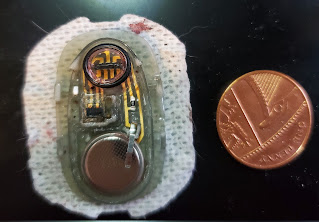
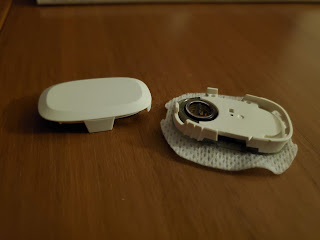
Interestingly since the Aidex system uses a more advanced (so I assume more expensive) chip compared to the Libre the sensor design is split into two, the sensor contains the battery and the sensor wire which clips into the unpowered transmitter unit. It’s a shame to see that the lifespan issue (which I had wondered about) has been solved by including a small disposable lithium battery inside each sensor patch, there must be a better, more environmentally friendly way to build these things.
(My first sensor expired so I took the opportunity to disassemble one)
Firstly in response to a bluetooth scan request it returns advertising data:
Scan Response Data: 0BFF5900240A00080706285706094169444558
  Advertising Data
    Manufacturer Specific
      Length: 11
      Type: Manufacturer Specific (0xFF)
      Company ID: Nordic Semiconductor ASA (0x0059)
      Data: 240A000807062857
    Device Name: AiDEX
      Length: 6
      Type: Device Name (0x09)
      Device Name: AiDEXType 0xFF (serial) - 24 0A 00 08 07 06 2857
The serial number is encoded with A-Z into hex 0x0A-0x24 and digits to their hex as values.
i.e. Serial# ZA0876=>240A00080706
This can be used to identify which device to listen to the broadcasts from and just parse the “manufacturer data” in the BLE broadcast packets.
First there’s a “new sensor mode” in this state the sensor (understandably) appears to have no knowledge of time and just returns whatever’s in its memory.
00 00 00000000 0000 00 00 0000FFFFFFFFFFFF0021
e7 01 7c010000 0700 01 04 FE00FFFFFFFFFFFF002a
e7 01 86010000 0800 01 04 FF00FFFFFFFFFFFF0090
The app then initiates a “warmup” sequence by sending time/date information to the sensor, the sensor then runs through a countdown phase for an hour. (0x3b -> 0x00) i.e. 59->00
e5 14 28bfa329 b101 02 04 FF00FFFFFFFFFFFF02ed
e5 01 1032ad29 b101 02 04 FF00FFFFFFFFFFFF02d3
d8 01 24589b29 0400 02 04 3B00FFFFFFFFFFFF0216
e5 01 2432ad29 0400 02 04 3900FFFFFFFFFFFF0200
e4 0b 2432ad29 0400 02 04 3700FFFFFFFFFFFF0288
Once the countdown hits zero the sensor age (see below) starts to increase and readings start.(along with some other fields I haven’t figured out)
cc 01 f8659b29 1200 02 04 0073FFFFFFFFFFFF02e8 < started
d9 01 02669b29 1300 02 0c 340aFFFFFFFFFFFF02fb < stabilizing
d9 01 34669b29 1400 02 07 3472FFFFFFFFFFFF02ea
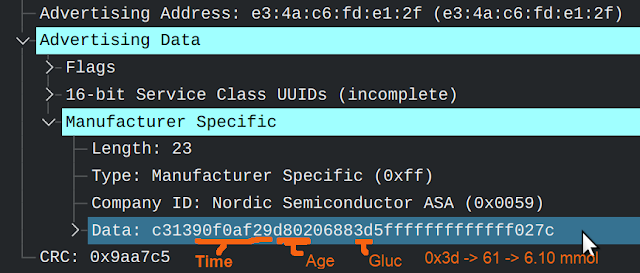
The fields appear to decode as:
1   2     3     4    5  6  7   8
C3 08 D09FB129 8604 06 88 40 5FFFFFFFFFFFFF029b
1. C3 - unknown?
2. 08 - sample age/10 = 80 secs
3. D09FB129 - time (epoch 1/1/2000 - 8hr China time!)
   699506640 + 946684800 - 28800 = 1/3/2022 19:24
4. 8604 - sensor age (in 5 min units) = 300* 0x486 /(24*60*60) = 4 days
5. 06 - sensor number
6. 88 - flags? unknown? 0x4=starting? 0xC = stabilizing?
7. 40 - glucose (mmol / 10) - 64/10 = 6.4mmol
8. 5F - unknown?
But that’s enough info to be able to get started and listen to live data, it’s possible to extract decode and display with the minimal processing.
e.g. live data to a Bangle.JS with a few lines of javascript (code link):
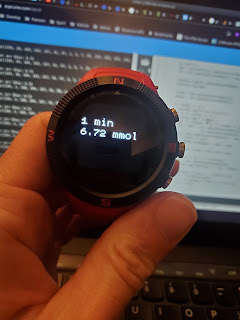
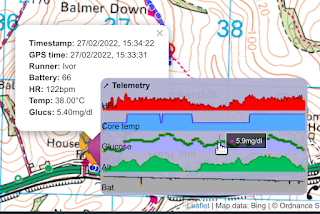
and the feed to my current tracker: